
ERD-Hub
A small tray program that lets a web page print to the printers on your own computer. Free to use with the ERD Report Designer.
Local printing for the browser
Label printers, office printers, network and serial printers, straight from a web page.
ERD-Hub runs in your tray and listens on your own computer only. Web pages of sites you have allowed can list your printers and print to them, without a browser extension and without printer drivers in the page. ERD-Hub is free to use and is part of the ERD Report Designer package.
What it does
Label printers
Delivers ZPL, TSPL, EPL2 and DYMO label bytes to the device, and holds the two-way session a DYMO printer requires.
Office printers
Prints PDF documents through CUPS on macOS and Linux and through a bundled PDFium on Windows.
Network and serial printers
Network printers on port 9100, found with mDNS, and serial printers over RS-232, USB serial or a Bluetooth serial link.
Private by design
Listens on the loopback interface only, with an allow-list of sites and an encrypted channel after the first handshake. No telemetry.
How a print job travels
A page asks the hub
A web page on an allowed site connects to the hub on your computer through a local WebSocket (ports 47810 to 47820).
The hub checks the page
The hub accepts loopback connections only, checks that the site is on its allow-list, and proves its identity with a signed handshake.
The page sends the document
The label bytes or the PDF come from the website; the hub does not generate printer language itself.
The hub prints
The hub delivers the job to the chosen printer and reports its progress back to the page.
How the pieces fit
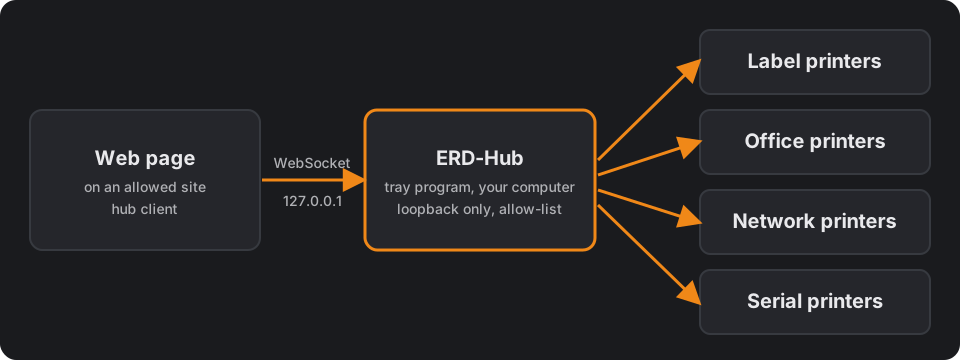
ERD-Hub is available as an unsigned beta for macOS (Apple silicon and Intel), Linux and Windows.
It is free to use with the ERD Report Designer; it is part of that package.
Download
macOS · Apple silicon
- Versionv0.1.1
- Size7.13 MB
- SHA-2563438f33c364d31ae…
- Released2026-10-20 13:00:45
Frequently asked questions
Which sites can print through ERD-Hub?
Only sites that ERDesigns has approved. The ERDesigns sites are built in, and users cannot add a site to ERD-Hub themselves. Want your own website to print through ERD-Hub? Contact us: we check your domain and set up the connection with you. Any other page is refused.
Does ERD-Hub send my data anywhere?
No. It listens on your own computer only and sends no telemetry. A crash report is a local file you choose to share.
Is ERD-Hub free?
Yes. ERD-Hub is free to use with the ERD Report Designer and is part of that package. Rendering through ERD Report Cloud is the paid service.
Which printers work?
Label printers using ZPL, TSPL, EPL2 or DYMO, office printers through PDF, network printers on port 9100 and serial printers.
Do I need administrator rights?
No. ERD-Hub installs per user. On Linux a one-time udev rule needs sudo for direct USB access.
Which systems are supported?
macOS (Apple silicon and Intel), Windows (x64) and Linux (x64), all as a beta.
Does it update itself?
Yes. An installed copy checks for a newer, signed release every 24 hours and applies it at the next start.